Your lights, conducted by the music.
Lumaestro listens to the music and runs your moving heads, washes and effects to the beat. Calm when the song is calm, wild when the drop hits. You can take over whenever you like.
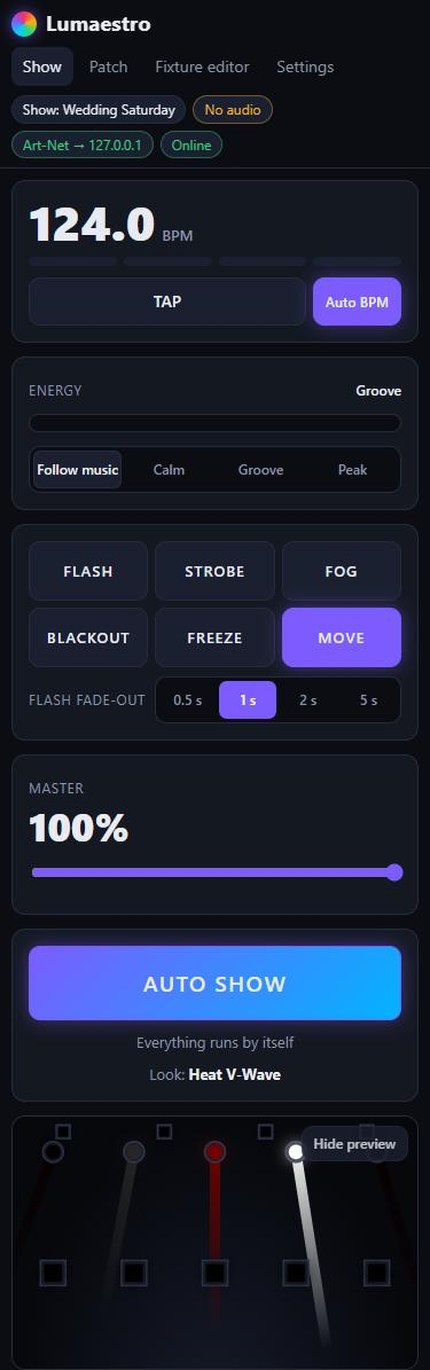
This is a simulation running in your browser, with the same kind of looks, movements and colour effects Lumaestro generates. Hold FLASH or STROBE, tap the tempo, or drag the phase.
The biggest update yet. Free, as always.
Lumaestro updates itself: press Update now in the green bar of the control page. The Art-Net Viewer updates itself too.
- Live control in blocks Choose which blocks the live page shows, their order and their size; drag a block and see where it lands. Touchscreen, Phone and your own layouts, every device picks its own; export, import and share layouts.
- Setlist Every song with its tempo, colours, energy and how it starts (AUTO SHOW, a scene, a look or blackout), with notes shown big on stage. Next song with a tap, a MIDI pad or a clicker. Import and export the setlist as an Excel or CSV file.
- Tempo from the DJ Follow the tempo, the beat and beat 1 of the bar from Ableton Link (Live, Traktor, Rekordbox, Serato, djay) or Pioneer CDJs and DJM mixers over Pro DJ Link.
- sACN (E1.31) Next to Art-Net and USB DMX: multicast or unicast, with universe offset and priority. All outputs can run at the same time.
- Pixel mapping LED strips, pixel bars and LED matrices on the Patch page, pixel by pixel as one picture that follows the look and the beat. Out to WLED or any pixel controller.
- Philips Hue and Nanoleaf Pair a Hue Bridge or Nanoleaf panels and every lamp becomes a fixture: in groups, scenes and the automatic show.
- An app on your phone Add the control page to your home screen with the Lumaestro icon, full screen with one tap.
- Fixture designs from the library Multi-lamp fixtures (LED bars, two heads on one base) come with their drawing from the online library; moving heads with LED rings move along with the show.
- A cleaner top bar Patch, fixture editor, arrange and settings as icons at the top right, and the name of the page you are on in the middle.
Everything a light show needs. Nothing to program.
Patch your fixtures once. Lumaestro works out what every channel does and builds a show that suits your rig.
Listens to the music
Finds the beat and the tempo, feels how energetic the music is and spots the drop. No audio? Tap the tempo and pick the energy yourself.
Runs the show for you
36 generated looks over calm, groove and peak, changing on musical phrases with smooth crossfades. Hit the drop and it jumps to peak.
Take over any group
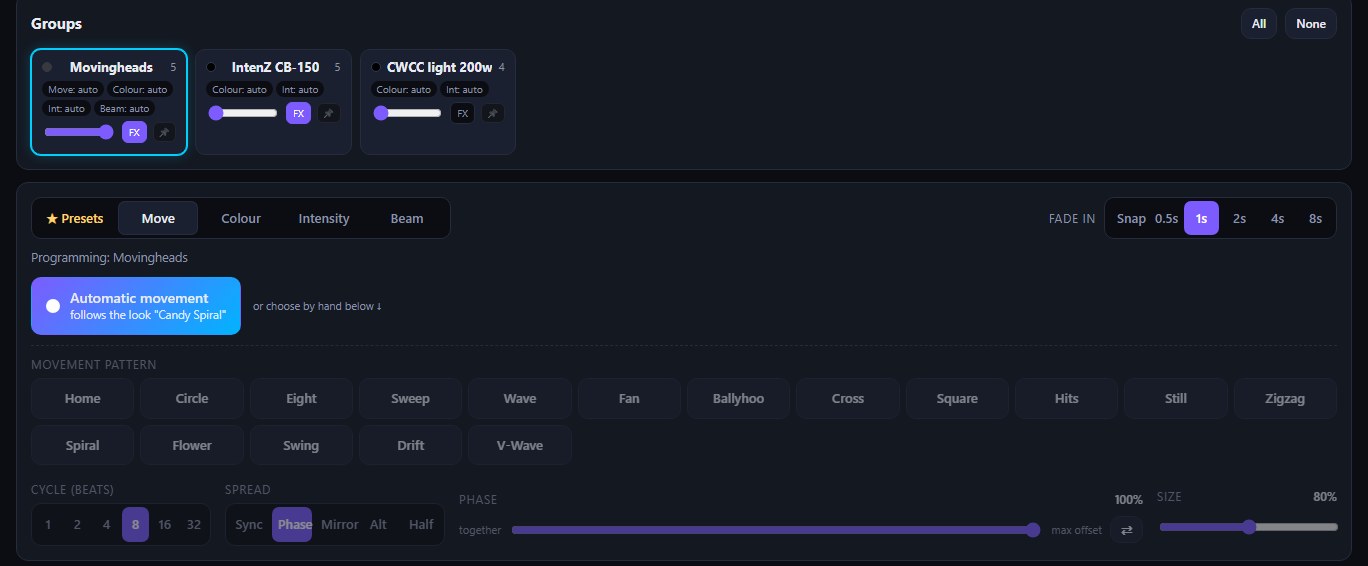
Give a group its own movement, colour, intensity or beam with one tap. The phase slider rolls a pattern through the heads, and presets save your favourites.
Effect buttons
Pre-heat and fire your Sparkulars, blinders or confetti from your own buttons. Hold or toggle, with a safety time limit and a keyboard key.
Moving heads under control
Draw the area each moving head or scanner may point at. Aim the real fixture with your finger to find the edges. Nothing shines into the audience.
2,200+ fixtures, open format
More than 2,200 fixtures built in, all in the open OFL format. New fixtures arrive from qmix.nl with one click. Missing one? Build it in minutes.
Play from your phone
The control page runs in any browser. Walk the room with your phone or tablet while several people control the show at once.
Shows for every gig
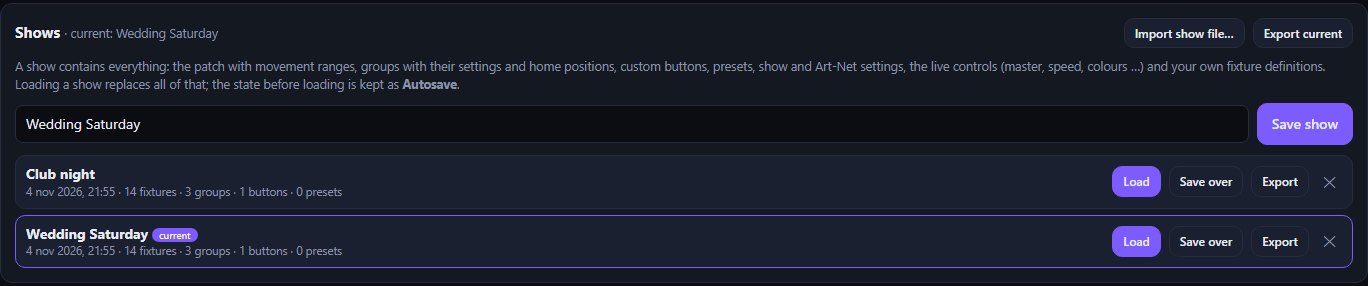
Save the whole setup (patch, groups, buttons, presets, scenes, settings) as a show. Load it at the next venue, or export it to another PC.
Safe by design
Reset and macro channels stay off, fog and strobe have time limits, holds release when a phone disconnects, and blackout always wins.
Art-Net, sACN and USB DMX
Send over the network to any Art-Net or sACN (E1.31) node, or plug in a USB DMX interface: Enttec DMX USB Pro and Open DMX, DMXking ultraDMX, Eurolite USB-DMX512 and uDMX. All at once is fine; the interface is found again on another USB port.
Passwords for the crew
One password to operate the show, one to edit the patch, scenes and settings. The bar staff can play, nobody breaks your setup. The PC itself never asks.
Starts the way you want
Choose what happens when Lumaestro starts: load your show, AUTO SHOW, blackout or a scene such as house light. Light or dark mode per phone, for the club or the outdoor stage.
Synced to the DJ
Follow the tempo and beat 1 straight from the DJ: Ableton Link (Live, Traktor, Rekordbox, Serato, djay) or Pioneer CDJs and DJM mixers over Pro DJ Link. Lumaestro only listens and never touches the DJ's tempo.
Setlist for the band
Every song with its tempo, colours, energy and how it starts: AUTO SHOW, a scene, a look or blackout, with notes shown big on stage. Next song with a tap, a MIDI pad or a clicker. Import and export it as an Excel file.
Your live page, your way
Choose the blocks of the live page, their order and size. A touchscreen layout with your buttons on top and big faders, a phone layout for the dance floor: every device picks its own, and layouts can be exported and shared. Add it to your home screen like an app.
Pixel mapping
LED strips, pixel bars and LED matrices pixel by pixel, as one picture that follows the look and the beat: waves, chases, sparkles, fire. Out over Art-Net, sACN or USB to WLED or any pixel controller.
Philips Hue and Nanoleaf
Pair a Hue Bridge or Nanoleaf panels and every lamp becomes a fixture in your patch: in groups, scenes and the automatic show, next to your DMX lights.
Lightweight
No gaming PC needed. Lumaestro runs fine on a small tablet PC like a Surface 3 with an Intel Atom processor, so an old laptop or a mini PC next to the desk does the job.
One tap and a group is yours.
Select groups, pick a layer and press a button. The group crossfades from the automatic show to your setting, and Auto hands it back.
- 17 movement patterns with cycle, spread and size
- Phase slider: from all together to a rolling wave
- Fixed colours, white temperatures and colour effects
- Presets with every layer, one click away
- Scenes built from the ground up on their own page: per group and per lamp colour, level and position, for theatre, bar, club and stage; play them with Next or on time
- Gamepad and MIDI control for scenes, buttons, master and group levels, with button lights on Launchpad, Launch Control, APC mini, APC Key 25, MIDImix and nanoKONTROL2
- Tap the tempo on your mixing desk: Allen & Heath SQ, Behringer X32 / X-Air and any OSC sender, learned like a MIDI key
- XY aim pad for solo spots, with stored positions on a MIDI pad
- Edit, duplicate and delete auto looks; choose which colours the auto show may use
- Built-in updates (can be switched off)
- Shut down or restart the PC from your phone (password)
- Passwords for operating and for editing
- Light and dark mode
- Start-up mode: show, AUTO SHOW, blackout or a scene
- Art-Net and USB DMX interfaces side by side
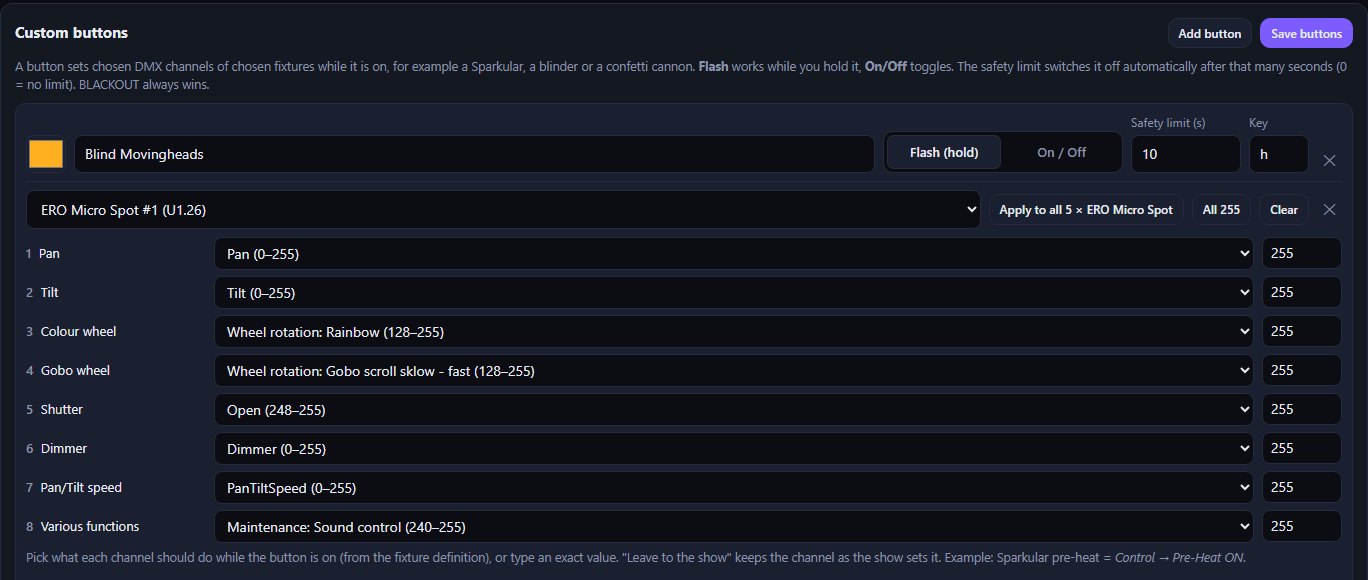
Sparks on cue. Safely.
Every DMX channel of a fixture is listed with what it can do, straight from its definition. Pick "Pre-Heat ON" or a spark height, apply it to all your Sparkulars at once and give the button a safety limit.
- Flash (hold) or on/off
- Safety limit in seconds
- Keyboard shortcut per button
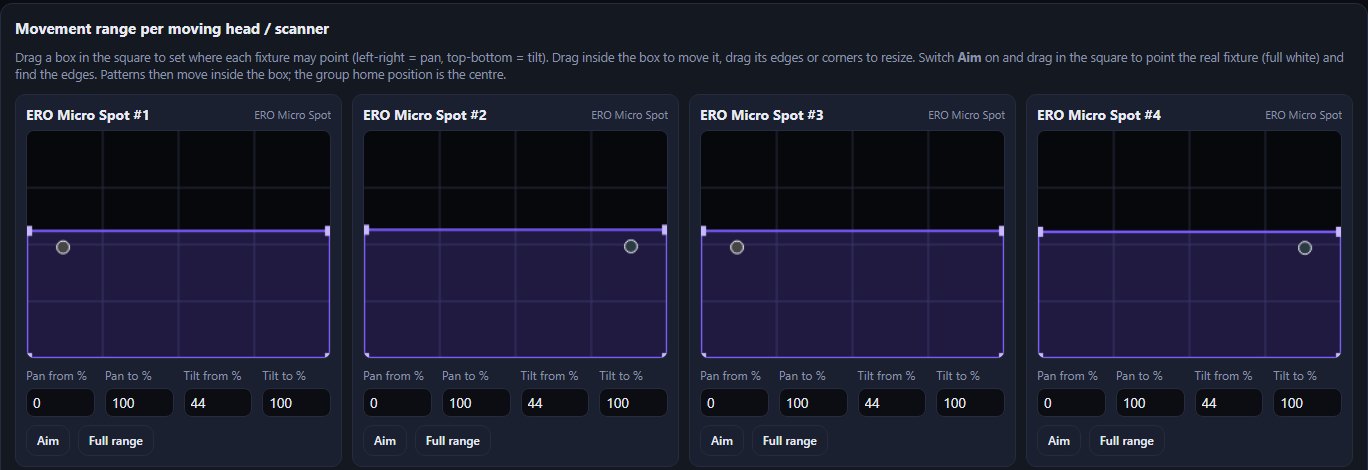
Your heads stay where they belong.
Drag a box per moving head or scanner. Switch on Aim and the real fixture follows your finger in full white, so you find the edges of the stage in seconds. Every pattern then moves inside the box.
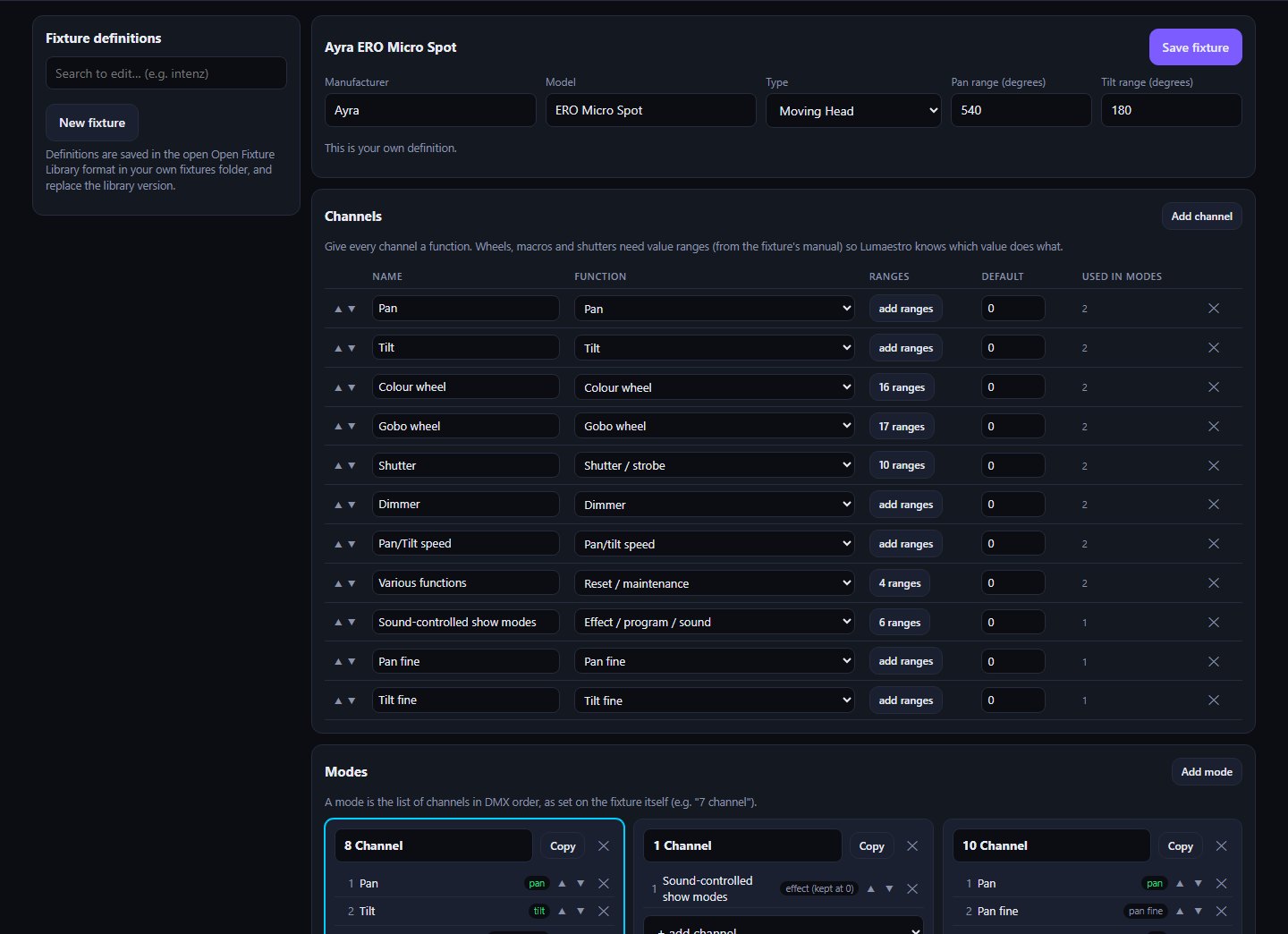
Any fixture. In minutes.
Give every channel a function, add the value ranges from the manual and see live how Lumaestro will use each mode. Definitions are saved in the open Open Fixture Library format.
- Colour wheels, gobos, shutters, macros, fine channels
- Live check: mover, wash, white, dimmer, effect
- Library of 2,200+ fixtures, new ones added online
Ready for the next gig. And the dance floor.
Save the complete setup as a show and load it at the next venue. Control everything from your phone; Lumaestro itself sits quietly in the tray with a status window and start/stop.
From download to show in three steps.
Patch
Start Lumaestro.exe, enter your Art-Net node or plug in your USB DMX interface, and add your fixtures with their DMX address. Lumaestro works out the rest.
Play the music
Pick the microphone or line-in that hears the music. Lumaestro finds the tempo and feels the energy.
Enjoy, or take over
Press AUTO SHOW and the show runs itself. Grab a group, fire an effect or load a preset whenever you want.
What you need
| Computer | Windows 10 or 11, 64-bit. Lightweight: runs fine on a Surface 3 (Intel Atom) |
|---|---|
| Program | One file, Lumaestro.exe (v1.5.3, 41.8 MB). No installer, no account. |
| Output | Art-Net (unicast or broadcast), sACN / E1.31 (multicast or unicast) and USB DMX, multiple universes, 10–60 fps; pixel mapping; Philips Hue and Nanoleaf |
| DMX interface | Any Art-Net node, or a USB DMX interface: Enttec DMX USB Pro / Open DMX, DMXking ultraDMX, Eurolite USB-DMX512 (PRO), uDMX |
| Fixtures | Open Fixture Library format (JSON), 2,200+ included (browse the library), own definitions via the editor |
| Music | Any microphone or line-in; works without audio on its own beat clock. Tempo from the DJ: Ableton Link, Pioneer Pro DJ Link |
| Control | Browser on the PC, phone, tablet or touchscreen in the same network; add it to the home screen as an app |
| Internet | Not needed (only to update the fixture library) |
Questions
Is Lumaestro really free?
Yes. Download it, use it at your gigs, no account and no time limit.
Which DMX interfaces work?
Everything that receives Art-Net: network nodes, Art-Net to DMX boxes and many USB/wifi interfaces with Art-Net support. Enter the node's address or the broadcast address of its network. USB DMX interfaces (dongles) work too: Enttec DMX USB Pro and Pro compatibles (DMXking ultraDMX, Eurolite USB-DMX512 PRO), Enttec Open DMX and the cheap FTDI USB-DMX cables, and the uDMX. sACN (E1.31) works too, for WLED, pixel controllers and sACN nodes. Art-Net, sACN and USB can run at the same time.
My fixture is not in the library. What now?
First press "Update fixture library": new fixtures are added from the online library. Still missing? Build it in the fixture editor: give each channel a function and add the value ranges from the manual.
Do I need to program cues or scenes?
No. Lumaestro generates the looks for your rig and runs them to the music. You only step in when you want to: per group, with presets or with your own effect buttons. Want a fixed running order? Save scenes and step through them with Next, or let them play on time.
Which MIDI controllers light up their buttons?
Every MIDI controller and gamepad can trigger scenes, buttons, aim positions and faders. On these controllers Lumaestro also lights the buttons you use (dim = bound, bright = on), recognised by name:
- Novation Launchpad Mini MK3, X and Pro MK3 (programmer mode is switched on automatically), Launchpad MK2, Pro, S and Mini
- Novation Launch Control and Launch Control XL (factory templates)
- Akai APC mini and APC mini mk2, APC Key 25, MIDImix
- Korg nanoKONTROL2 (set LED Mode to External in the Korg Kontrol Editor)
- Any other controller that lights a button on note / CC value 127: choose Generic in Settings → Gamepad & MIDI
Can I tap the tempo on my mixing desk?
Yes. Lumaestro connects to the desk over the network and learns its keys like a MIDI controller: map the FX tap key to TAP and you tap the tempo once, on the desk, and the light follows. Supported: Allen & Heath SQ (MIDI over TCP), Behringer X32 / M32 and X-Air / XR (OSC), and any OSC sender such as a DiGiCo macro, TouchOSC or QLab. The motor faders of a Behringer X-Touch work as faders too.
Does it need a fast computer?
No. Lumaestro is lightweight: it runs fine on a Microsoft Surface 3 with an Intel Atom processor. An old laptop, a mini PC or a small tablet PC is enough.
Can it follow the DJ's tempo?
Yes. With Ableton Link it follows Ableton Live, Traktor, Rekordbox, Serato, djay and other Link apps on the same network; with Pro DJ Link it follows Pioneer CDJ / XDJ players and DJM mixers on the same network switch. The tempo, the beat and beat 1 of the bar come from the DJ, the energy and drops still from the microphone.
How do I move to another PC?
Export all your own fixtures as one zip in the fixture editor and export your shows under Settings. On the new PC, start Lumaestro and import both. A show file even carries the fixtures it uses.
Windows warns about an unknown program.
Lumaestro is not code-signed, so SmartScreen may warn the first time. Choose "More info" and "Run anyway". The SHA-256 below lets you check the download.
Can I use it next to other lighting software?
Close other software that sends to the same lights while Lumaestro runs; two programs on one universe make the lights flicker.

Let the music run your lights.
Download Lumaestro, put it in a folder and double-click. The fixture library unpacks itself on the first start.
SHA-256: 70b5b0c46c13dfadec6fc67c683a64ef71789f243cb007d4338999bd06c576f1
Also free: Lumaestro Viewer
See what your Art-Net really does, without the lights. The viewer listens to the network, from Lumaestro or any other Art-Net program, and draws your rig live: colour, dimmer, movement, gobo and strobe. Own patch with universe per fixture, loads Lumaestro shows, makes and imports fixtures.
SHA-256: 2aa8b6a81a2e43acc5597d008a197e795c4136d972ae6e8f5bd31c82883a5c5d